ItemsExchange
| Part of a series on |
| Civ+ Mechanics |
|---|
 |
| Core |
| Common |
| Minor |
ItemsExchange is a plugin exclusive to Civ+ that adds shop chests styled like shops in Youtuber SMPs like HermitCraft. It is centered around the Shop Gem, which allows configuring the price to buy any one slot in a chest the Shop Gem is placed within.
The plugin was added to Civ+ on February 27th, 2026 and replaces CivCraft's ItemExchange.
Buying From A Shop

If a Shop Gem is within a reinforced container like a Chest or Barrel, players without the CHESTS NameLayer permission will still be able to open the container. When the player removes a slot of items from the container it will automatically remove the payment from the player's inventory. If the player doesn't have the required payment, they'll be unable to remove the item(s).
Creating A Shop
-
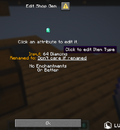 Right-click menu for a Shop Gem
-
 Screen for editing Quantity
-
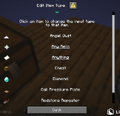 Screen for editing Item Type
-
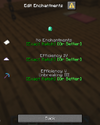 Screen for editing Enchantments


A Shop Gem can be crafted using 1 Stick and 1 Paper. Right clicking with a Shop Gem will open a Dialog that allows editing the amount, item type, anvil rename, and enchantments of the item(s) that are used as payment. Clicking on a property will allow you to edit it by copying that attribute from items in your inventory.
An advanced user can also use the /input command to edit a Shop Gem's settings without needing to have examples of what you want to buy in your inventory.[1]
Quantity
The number of items to take from the player's inventory when they remove an item from the chest. If this is more than one stack of items and there isn't enough room in the chest to accept the full payment, the player will be unable to buy from the chest.
Item Type
The minecraft:item_name component of the item used as payment. Civ+ uses this component for all custom items with few exceptions. There are also special item types provided for allowing the player to pay with any type of Relic, and Treasure Maps pointing to specific Relics.
Renamed To
This is what the item has been renamed to in an anvil. In addition to taking properties from your inventory, there are also properties for an item that hasn't been renamed and accepting an item regardless of if it has been renamed or not.
Enchantments
A list of enchantments that must be on the item. For each item in your inventory, you can select Exact Match to require that items have exactly those enchantments (no more, no less) or Or Better to accept items that have additional enchantments or those enchantments at a higher level.
Relics
Civ+ has Relics in economic circulation dating back to when the server was on 1.8.9, and these Relics still function as intended. Newly obtained Relics use the minecraft:item_name component (which maps to Item Type), while 1.8.9 Relics use minecraft:custom_name component, which maps to Renamed To. Because of this, making a chest shop that buys relics is slightly complicated. You should use an Item Type of Any Relic and Enchantment set to the enchantment set to the enchantment corresponding to that relic.
References
- ↑ Amelorate (2026-05-24). "<@&791021339674411063> # Changelog #108 for Sunday, May 24th, 2026 * You can now **click an item** …<@&791021339674411063> # Changelog #108 for Sunday, May 24th, 2026 * You can now **click an item** in the **Recipe Book** to see what **other recipes** use or **create that item** * **Added recipes** for **Firefly Bushes**, **Pink Petals**, and **Spore Blossoms** to the **Garden of Eden Creation Kit** * **Removed **all **existing Strength**, **Resistance**, and **Regeneration **potions on the map * Added the `/input` command. It can be used to edit specific properties of Shop Gems without having to have items in your inventory that have an example of that property * Removed the ability to compress Diamond Ore in the Compression Factory. You can still decompress already-compressed Diamond Ore * Kegs now say how to remove potions from them in their right-click menu * Buffed the reinforcement values for Amethyst Spikes" – via Discord (#changelogs). Civ+. Retrieved 2026-06-03. Screenshot