Frequently Asked Questions (Civ+)
| Part of a series on |
| Civ+ Mechanics |
|---|
 |
| Core |
| Common |
| Minor |
Civ+ is a fairly intuitive Civ server. That said, sometimes you have questions. Yours might already be here.
Basics
| Join Civ+ | |
|---|---|
| Minecraft Version | Java Edition 26.3[1] |
| Address | play.civ.plus |
| Website | https://civ.plus/ |
| Subreddit | /r/civplus |

What is the IP of Civ+?
You can join the server at play.civ.plus. The server is on Minecraft Java Edition 26.3[1], though you can join with as early as Minecraft Java Edition 1.21.9[2].
Is there a map of the server? Where am I?
-
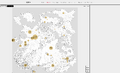 Screenshot of the server's livemap
-
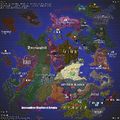 A player-made map of land claims on the server


Yes, there is a map of the server. When you join the server you'll get an item called a World Map that shows you where you are on in the map. You can right click with a World Map in your main hand to add waypoints to this map. You'll also get a World Map if you die without a bed set.
You can also go to https://civ.plus/livemap to see a live map of the server. It updates once per day and congregates important information about the server.
Where can I find nations?
When you join the server, especially if you've joined during peak hours, it's likely that someone will try to recruit you in Global Chat. If that didn't happen, you can still find a nation by joining the Civ+ Discord and saying hello in the #general channel or by scrolling through the #nation-adverts channel. There's also List of Nations on Civ+, but it's less frequently updated by people looking to recruit and you'll still probably end up needing to join whatever nation you decide on's discord.
Don't sweat it about picking the correct nation. If you don't like whoever you've joined, you can always leave and join another. Few nations restrict leaving or discriminate based on what nation you've been in before, especially when you're open about sharing your experiences.
How do I play?
For the most part, you can join the server and play with your normal knowlege of Minecraft. Most of the changes Civ+ makes to the game outside of quality-of-life come after you've crafted a Diamond Pickaxe, and you are always given tutorial books explaining when you come across an unfamiliar mechanic. You can just simply join the server and it'll teach you how to play.
That said, Civ+ is well documented on this wiki. You can get to know the server's mechanics on a greater level by looking through the Civ+ page and Mechanics (Civ+).
What can I do on Civ+?
Anything. Have you watched a youtuber SMP and lamented at the fact that they're basically just pretending and one bad apple would be able to ruin everything? Well, Civ+ has the mechanics to make things that would normally only be pretending and playing along actually real.
Do I need mods?
No, not really. Many features you'd normally find in mods are built into Civ+. A mapping mod like JourneyMap or VoxelMap can help, but it's not required because of the existence of the World Map item. Litematica is also a nice to have, but you aren't likely to need it early in your Civ career.
How do I talk to people? Why can't I talk in local/global chat? What are channels?
When you join the server, you'll start off in Global Chat. You can move to Local Chat using the command /local or saying . in chat. Then you can move back to Global Chat using /global or !. Putting a channel's symbol before your message (like ! Hello) will send only that message in that channel.
If you can't talk, you probably need to adjust your Xbox Settings for Privacy & online safety.[3] If you live in the UK or Europe this setting defaults to not allowing you to speak in multiplayer servers. For more information, see Troubleshoot Minecraft: Java Edition Chat Access.
A Channel is somewhere chat messages go. It has a Channel Prefix, like ! or ,Amelorate,SepiaTones. Putting a Channel Prefix before a message will send your message in that channel. Channel Prefixes that contain commas are Direct Message channels. The shortcut command for DMs is /msg PlayerName.
I accidentally disabled the Civ+ Server Resource Pack! How can I enable it?
-
 What it looks like to have the resource pack disabled
-
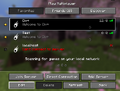 Click the Edit button, outlined in white
-
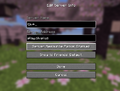 Click Server Resource Packs until it says Enabled


If many custom items look like black and purple boxes, you've probably disabled the Civ+ Server Resource Pack. Fixing this is simple. Just disconnect from the server, click the Edit button for Civ+ on the Multiplayer Server List, then click Server Resource Packs until it reaches the Enabled option. Custom items should appear as expected when you rejoin the server.
Why is there a [X] button next to my name when I say something in chat?
-
 A message that can be deleted
-
 Example of a message that has been deleted


That's the delete button. You can delete the messages you've sent. Use this if you've misspelled something if you've or said something in the wrong channel.
Why can't I see the Civ+ Options in the Escape Menu?
Uninstall Roughly Enough Items. For some reason REI messes with datapacks that use Dialog additions.
General Gameplay
Where did I spawn? Where is everyone?
When you join the server for the first time, you spawn in a randomly selected location in the wilderness. If you've joined off peak hours, it's possible that everyone online is afk and/or asleep. If that's happened, you should join the Civ+ Discord and ask around.
How do I start a nation?
You probably shouldn't. However, if you don't want to join someone else's nation you can create your own nation by simply declaring it done in a /news post.
Can I raid/grief? Should I?
You sure can. But you probably shouldn't, unless you want to make a career out of it. If someone knows you're a raider they'll likely try to kill you with a weapon enchanted with Vorpal and trap you in The End.
How do I protect my builds?
Hold Stone in your offhand while you're placing blocks. These blocks will be Reinforced, and other players will have difficulties breaking them.
If your thing is already built, left click every block with Stone in your main hand.
If you wish to Reinforce the blocks on a specific group, use the command /ctr [GroupName]
I can't break this block! This door won't open! I can't access this chest!
Those blocks are Reinforced. That means that someone has spent a block of Stone, an Iron Ingot, or a Diamond to make it harder to break.
If you want to break in, just break the block a bunch of time. The number that appears when you break the block tells you how many breaks the block can withstand. If you want to see this hologram without breaking the block, just do /cti on.
That said, breaking into places and stealing is frowned upon by most players. If you get caught, they might kill you using a weapon enchanted with Vorpal, imprisoning you within the end.
How can I give access to a certain group of people?
You can use a Group for this. They're pretty much just like a Discord server, if you're used to configuring permissions and roles for those. Press Quick Actions (defaults to G), then click Groups. Then click Create a new group. Follow the prompts, and once you group is created click the This group has 1 member text to invite more members.
Is there a way to break reinforced blocks?
Just simply keep breaking the block. When the number that appears on the block reaches 0, the reinforcement is broken and you can now interact with the block, or break it one final time to break it for real.
You can also use Fulminating Gold to break many blocks at the same time, though this is more expensive and if there's only one block to break it'll be slower than breaking it using a Pickaxe.
How did you know that I griefed? What are snitches?
| Ingredients | Crafting Recipe |
|---|---|
| 8 Stone 1 Spider Eye |
   
|
| 8 Stone 1 Eye of Ender |

|
A Snitch is a special Sculk Sensor that records what's happening around it. It has two variants: A regular Snitch will send out notifications to players who are online and to Discord, and a Logging Snitch will also log actions to be checked later.
If you do something bad within the radius of a Snitch, whoever owns that Snitch is likely to hold you accountable.
Why does Civ+ have a 5x5 Crafting Table?

Having the extra space lets us make highly intricate recipes that require a great deal of resources to craft. Don't worry, the new Crafting Table isn't unwealdy to use. Our crafting plugin, MeansOfProduction has gotten years worth of love and polish. In some ways, it's easier to use than the vanilla Crafting Table.
The server sent me a message in my Action Bar, but it went away. How can I see it again?
You can use the /journal command. It displays all messages the server has sent you in chat (excluding player messages) and on your action bar in the past hour using a Dialog. If you want it to only display action bar messages, you can configure that in Civ+ Settings > Chat Settings > Show system chat messages in /journal.
How do I name a Sanctuary?
| Ingredients | Crafting Recipe |
|---|---|
| Any Nugget + Paper |
  
|
You can rename a Sanctuary by right-clicking it with a Name Tag that has been renamed in an Anvil. You can craft a Name Tag using one iron or copper nugget, and a piece of paper.
Why can't I craft a Diamond Sword/Armor?
| Ingredients | Crafting Recipe | Description |
|---|---|---|
| 56 Diamonds |  [[|7]][[|7]][[|7]][[|7]][[|7]]  [[|7]][[|7]][[|7]] |
Armor items take 7 Diamonds in each slot |
| 18 Diamonds | [[|9]][[|9]] 
|
Swords take 9 Diamonds in each slot |
| 12 Diamonds 2 Sticks |
[[|12]]
|
Spears take 12 Diamonds |
| 3 Diamonds 2 Sticks |

|
Recipes to craft tools are unchanged |
Diamond items that can be used for PvP are more expensive than in vanilla. Armor takes 7 Diamonds in each slot, while a Diamond Sword requires 9 Diamonds in each slot. A spear requires 12 Diamonds to craft. The recipes to craft tools are unchanged, however. Diamond Axes are notible for being cheap despite being moderately useful in PvP because you can't put the Vorpal enchantment on a Diamond Axe.
I have too many tool / utility items in my inventory!
| Ingredients | Crafting Recipe |
|---|---|
| 1 Leather 1 String |
   |
This is a known problem with the low-command design of Civ+. There is a partial solution though: Bundles. Many of Civ+'s custom tool items, tutorial books, and utilities are consitered "stackable" and will only take up one of the 64 slots in a Bundle.
Economy & Progression
How do I find ores and diamonds?
Breaking stone has a random chance to drop ores. Below y16 you can find Diamonds, but above Y16 you have an increased chance of finding Iron.[4] That's it. No matter how you mine or in what biome, you'll get ores. No complicated vein system. The only thing that affects your drop rates is the Fortune enchant, which makes diamonds and special items from mining more common, and basic ores like Iron, Coal, Gold, and Redstone less common.[5]
What are factories? How do I set them up/operate them?
A Factory is a type of block that unlocks recipes in the 5x5 crafting table when you stand near it. To set up a factory, just craft it and place it down. It'll be instantly usable, but if you pick it back up you'll have to wait an hour after placing it back down for it to assemble. A few examples of the recipes used to craft factories are included below. There's a lot more than 2 factories in the game, of course.
| Ingredients | Crafting Recipe |
|---|---|
| 384 Blocks of Iron 256 Pistons 32 Redstone Blocks 32 Chests 64 Furnaces |
 [[|64]][[|64]][[|64]]  [[|64]]  [[|16]][[|64]]  [[|16]]  [[|64]][[|16]][[|64]][[|16]][[|64]][[|64]][[|64]][[|64]] |
| 10 Tinted Glass 2 Raw Salmon 2 Nautilus Shells 4 Water Buckets 2 Pufferfish 2 Tropical Fish 24 Blocks of Redstone |
      [[|24]]  
|
What are compressed items?
 | |
| Rarity tier | Varies by compresson level |
|---|---|
| Renewable | Varies by core item |
| Stackable | Yes |
A compressed item is an item that's been compacted inside the Item Compressor factory. Most items can be compressed, with the exception of valuable items. In other words, items you have a lot of like Dirt, Sand, Cobblestone, and Stone can be compressed. When you craft 9 items together in a Item Compressor, you'll get 1 Compressed Item. Then, you can craft together 9 Compressed Items to get a Double Compressed Item. That continues all the way up to an Octuple Compressed Item, which is equal to 43,046,721 uncompressed items.
| Ingredients | Crafting Recipe |
|---|---|
| 9 Cobblestone | 
|
| 9 Compressed Cobblestone |
|
| 1 Compressed Cobblestone | [[|9]]
|
Why aren't my crops growing?
To make the task of farming crops to get ExP more interesting, crops grow slowly in amounts of time measured in real-life hours and days depending on what biome they're growing in. For example, Cactus grows quickly in the Desert and Wheat grows quickly in the Savannah. To see how long it takes to grow a crop, right click it with a Gardener's Grimoire. You get one when you plant crops for the first time and get the tutorial book about how crops work.
| Ingredients | Crafting Recipe |
|---|---|
| 1 Carrot 1 Lapis Lazuli 1 Book |
   
|
How do I get ExP?
| Ingredients | Crafting Recipe | Description |
|---|---|---|
| Any Relic 1 Cookie 1 Pumpkin 1 Hay Bale 1 Potato 1 Melon 1 Nether Wart 1 Cake 1 Carrot |
       [[|32]]  
|
Basic ExP Recipe
Shapeless recipe Converts Relics to ExP at a ratio of 1 Relic to 32 Exp Bottles |
Civ+ changes how you gather ExP and enchant your items. To get ExP, you need to craft it using the Basic (shown above), Intermediate, or Advanced ExP recipes. Each subsiquent recipe uses more crops, but produces more ExP per relic. The Intermediate and above recipes produce Emeralds, which can be crafted into ExP bottles at a rate of 11 Bottles per Emerald.
Additionally, Civ+ changes the ExP Level scaling math. No matter how many levels you have on your player, it always costs 7 ExP Bottles to advance 1 level. This makes calculating how many Bottles you need to enchant something much simpler, and it also makes adding many enchantments to items much cheaper.
How do I enchant my gear?
| Ingredients | Crafting Recipe |
|---|---|
| 9 Gold Nuggets 4 Iron Ingots 1 Redstone Dust |
   
|
Civ+ changes how you obtain enchants for your gear. Rather than using an Enchanting Table, players instead adventure the map with a Relic Hunter's Compass or Relic Map in search of Relics. When you arrive at the compass or map destination, you're rewarded with an enchanted Relic item. You can use these Relics like Enchanted Books in an Anvil to apply their enchants onto any item you want.
How can I set up a shop chest?
Craft a Shop Ledger. Right click with it in your hand to configure the item you want to buy. If you're selling something, then set it to Diamonds or Iron. Then put the Shop Ledger in a chest. Then fill each slot with the item you want to sell. Make sure to reinforce the chest. Players will be able to open the shop and take stacks of items out, but the Shop Ledger will automatically remove the payment items from their inventory, at a rate of 1 slot's worth of items per payment. Of course, they won't be able to remove items if they don't have payment.
| Ingredients | Crafting Recipe |
|---|---|
| 1 Stick 1 Gold Ingot |
 
|
Is there an auction system?
Not exactly. There's nothing preventing you from creating your own auction house, but there's no official auction house.
How can I start my own company?
Just like creating a nation, to start your own company you just simply declare it done. Maybe you can make a post in /news, though.
Combat
Are you 1.8.9 PvP or 1.9+ PvP?
Yes. You can craft a Rapier if you want 1.8-ish pvp, or a regular Diamond Sword if you want 1.9 pvp. They're both good in different situations, so a smart player might even bring a different sword depending on the situation. That said, using the wrong sword won't get you killed. You'll just do a little less damage.
| Ingredients | Crafting Recipe |
|---|---|
| 27 Diamonds 1 Stick |
[[|9]][[|9]][[|9]]
|
How can I enable the server side radar?
-
 Game Menu: Click Civ+ Settings
-
 Civ+ Settings: Click Radar Settings
-
 Radar Settings


Civ+ has a server-side radar. That means that when a player enters your render distance, you have the choice of receiving a message and hearing a sound. All players within your render distance are also displayed on your Locator Bar.
To enable this, hit the Escape Button, then click Civ+ Settings, then Radar Settings. Check all options you want enabled.
There is a deep hole lined with obsidian next to me. What are vaults?

A Vault is a defensive structure used to store Vorpals. They are usually used as the center of a nation's military might, and are very difficult to penetrate. They're typically also designed so if you accidentally find yourself in one it'll be very difficult to escape.
In other words don't jump in or else you'll make somebody angry. Hopefully they'll let you out instead of killing you and imprisoning you within that very vault.
Vaults also have bastions. That means that if you try to build a bridge over any pits, the blocks will dissapear after you place them and you'll fall in.
What is Vorpal? Why did I respawn in the end?
Vorpal is an enchantment you can put on a weapon. If you kill someone with that weapon, the person you kill will be imprisoned within your weapon and will be in the end until you free them, or your weapon runs out of fuel. If you're respawning in the end, that means someone has killed you and trapped you within their sword. If you press Tab to look at the Tab Screen, you can see where the sword is. You can also run /vp locate to see where the sword is.
I vorped somebody, what happens now?
Vorping is the practice of killing someone with a weapon enchanted with Vorpal. If you've vorped someone, then you'll need somewhere to store the Vorpal weapon they're trapped within. If you log out with a Vorpal weapon with someone inside, the weapon will be dropped to the ground and they'll be freed after 5 minutes. So instead you'll need somewhere safe to store the weapon. If it's somebody unimportant, or somebody severely unpopular it might be unlikely that anyone will try to free them by tracking down your weapon and stealing it. If that's the case, you could probably get away with storing the weapon in a Bunker, which is just a reinforced room where the walls are made out of Obsidian.
If you've vorped somebody popular, things get more complicated. They will quickly put their friends to the task of freeing them, so if you don't already have a Vault built it's probably too late. The core of a vault is a pyramid of Diamond-Reinforced Obsidian, and Diamond takes 36 hours to mature after being reinforced. Immature reinforcements are very easy to break. Similarly, you'll also want to surround your pyramid of DRO with Bastions, and those need to be reinforced too. Not to mention that all of this ends up being very expensive, especially if you don't have anyone to fund all of this.
Rules & Admins
What are the server rules?
You can see the Rules of Civ+ by running /rules ingame, or in the #rules channel in Discord. You're also presented with the Rules of Civ+ when you join the server, and you must agree to them before you'll be allowed to log in. Don't worry, when you're in the pre-join rules screen your character hasn't appeared in the world, so you have all the time in the world you need to read.
In general terms, hacking, cheating, alting, and doxxing aren't allowed. You are required to follow Mojang's EULA while ingame, and Discord's TOS when in Discord.
I followed the rules of the server. Why did someone imprison me within the end?
Just following the rules is not enough to prevent people from wanting to Vorpal you. You also have to follow the laws and regulations of wherever you currently are. If you break the laws someone has set out, they may wish to get revenge upon you.
People might also try to vorp you if they just plain don't like you. Try to be more likable.
Why was someone banned?
In general, you'll never know unless that someone tells you why. The admin team only shares ban reasons with the banned player, and telling other players why is left to that player. Civ+ has no public list of bans with reasons, as that could lead to the harassment of the players on that list.
I got banned for hacking!
Hacking is not allowed on Civ+. Though the server has minimal rules, the use of mods to gain an in-game advantage is something against the rules. Don't worry though. If you go to https://civ.plus/contact and modmail the admins will be happy to review your case, especially if you're polite and patient.
I need to report a player.
If you believe a player has broken the rules, you can report them at https://civ.plus/contact. Do note that you won't hear back from the admins unless they need more information on the case. The admins review all modmails, though they avoid needlessly replying to avoid exposing information about other players that could be seen as doxxing, libelous, or defamatory.
References
- ↑ 1.0 1.1 Lua error in Module:Citation/CS1/Configuration at line 2213: attempt to index field '?' (a nil value). Cite error: Invalid
<ref>tag; name "Template Civ+ Version Reference" defined multiple times with different content - ↑ Lua error in Module:Citation/CS1/Configuration at line 2213: attempt to index field '?' (a nil value).
- ↑ https://help.minecraft.net/hc/en-us/articles/43413776295437-Troubleshoot-Minecraft-Java-Edition-Chat-Access
- ↑ Lua error in Module:Citation/CS1/Configuration at line 2213: attempt to index field '?' (a nil value).
- ↑ Lua error in Module:Citation/CS1/Configuration at line 2213: attempt to index field '?' (a nil value).